


We've introduced a new release format designed to give you clearer visibility into what's new, what's improved, and what's coming next. Watch the video below for a quick overview of how our updated structure helps you stay informed and get the most out of every release.
RIM variants: TWO multi-user, for small to mid-sized companies FIVE multi-user, for mid to large-sized companies
October 2026
Version 26.2.0.0
-
Post-Publishing QC: A more capable Submission Repository Application Viewer for faster and more thorough checks

Reviewing a submission is now more flexible. Open documents in multiple panes straight from the outline view, scroll across submission documents, and move between pages and your viewing history. When you use Hold Page, hyperlink targets open in a new pane, so the document you are reading stays where it is. The new table view lists content nodes together with their node information and metadata, and you can export it. Together, these changes make the Application Viewer in the Submission Repository a more user-friendly and efficient place to review.
-
Light submission editing coming to the browser: restructure submissions and edit properties without the native app

You can now edit your submission structure directly in the webAccess Submission Workbench. Add, move, and delete nodes, and view and edit node properties, all in the browser. Changes are saved immediately, and temporary locking prevents conflicting edits when several people work on the same submission. It's one more step towards doing your Submission Workbench activities without the native app.
-
Now in beta: Hyperlink Target Prediction to significantly reduce manual efforts

LORENZ takes inter-document hyperlink resolution to the next level. Text-based target detection analyzes existing hyperlink text and automatically assigns matching targets based on predefined rules, significantly reducing manual work. For transparency, automatically resolved hyperlinks are flagged as Autogenerated and can be filtered and reviewed in the Find Hyperlinks pane. We also enhanced the resolution of inter-document hyperlinks, including Veeva permalinks, eLink Maker links, and links between documents imported via Windows Explorer drag-and-drop - without additional configuration changes. Text-based target detection and simulation mode can be enabled or disabled via the LORENZ configPanel. The new Resolve Hyperlink Targets dialog, accessible from a node's context menu in the Submission Workbench, provides a central entry point for initiating hyperlink resolution and speeding up your workflows.
Text-based detection is currently available as a beta feature. Results depend on the available reference information and document structure; automatically resolved hyperlinks should be reviewed. -
Gain transparency into keyword changes in eCTD 4.0 submissions

The new Keyword Audit Trail Timeline provides a consolidated view of keyword changes throughout the submission lifecycle. Users can review when keywords were created, updated, or deleted and identify who made each change. Advanced filtering by date, sequence, event type, keyword type, and user makes it easier to investigate changes and support audit and review activities. The report can also be exported in multiple formats for further analysis and documentation. Available in both the native Submission Workbench and webAccess Submission Workbench.
-
Speed of upload up to 100x faster

Uploading files is now much faster and more dependable. With the redesigned Storage Explorer, you can upload submissions up to 100 times faster
depending on submission structure and bandwidth . A new resume feature means an interrupted upload continues where it stopped, so you don't have to start over. Uploaded files are verified automatically, ZIP extraction and conflict handling have been improved, and you can preview files without leaving the Explorer. Clearer feedback tells you when an operation could not be completed. New File and Admin Activity Logs make file operations and administrative changes traceable and exportable, so the evidence you need for compliance and reporting is always at hand. -
From data to report faster than ever - fully automated
FIVE
With the 26.2 release, building a report starts where your question starts: with a search. From there, you select nodes and fields, apply filters, and design the report on a visual map of dependencies and connections, choosing for each field whether it serves as a filter criterion or a display field. Once your report is built, schedule it to run automatically and send it by email in the output format that suits your recipients. Recurring reporting now takes care of itself, so the right numbers reach the right people on time. Example: Your regulatory team needs a status overview of all Marketing Authorisations every month. You build the report once, then schedule it. From then on, it arrives by email on the first working day of each month, with no manual export needed.
-
Visualize how every record connects
TWO FIVE
See at a glance how any record connects to the rest of your data: what uses it upstream and what it references downstream. Open the interactive Data Map to follow those links step by step, so impact assessments and data checks take minutes, not manual digging. Example: You want a visual overview of which manufacturers are linked to your application? This information is now only a simple click away.
-
Turn any two dates into a number you can track
TWO FIVE
Turn the dates in your records into numbers you can act on with our new milestone enhancement. In the Product Registration module, power users and administrators can now define calculated fields, such as the days between Submission Date and Approval Date or the weeks remaining until a Deadline. Each field belongs to one Business Object and is built from an ordered list of calculation steps, using numeric fields, constants, anchor variables, and other calculations. Add the result as a column in your Results Pane, show Zit as a KPI in Dashboard gadgets, or use it in data views, searching, ordering, and reports. Timelines and deadlines become visible wherever you work.
April 2026
Version 26.1.0.0
-
Real regulatory insights, no setup required
TWO FIVE
With the 26.1.0.0 release, LORENZ introduces the first versioned standard RIM KPI Dashboard, starting with Submission Productivity metrics. Built on best-practice KPI definitions aligned with Gens & Associates RIM Industry Benchmarks and shaped by customer feedback, the dashboard gives you immediate, consistent visibility into regulatory productivity without any configuration. This is the foundation of a long-term initiative to bring industry-aligned, data-driven insights directly into LORENZ products, and version one is already worth opening.
-
A new resilient, always-on cloud infrastructure
TWO FIVE
LORENZ now delivers a new container–based cloud architecture designed for high availability, automated off–hours updates, and single– or dual–datacenter deployments to support redundancy and business continuity. The experience for your team remains familiar and consistent. Migration to new infrastructure will be necessary.
-
The Innova theme is now official
TWO FIVE
No more “experimental” label. The Innova theme is fully supported and has found its permanent home under “Appearance” in User Settings. Clean, colorful, customizable, and here to stay.
-
Accessibility and appearance settings, one click away
TWO FIVE
Font size, density spacing, contrast, and design preferences are now accessible directly at the top of each page in the navigation bar. Less time in settings, more time getting work done.
October 2025
Version 25.2
-
More control over your notifications
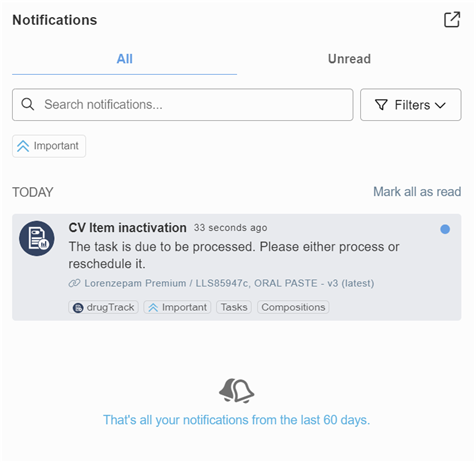
The User Notification Center will offer enhanced preference settings for greater usability. The new opt-out per category option lets you choose exactly which notifications you want to receive.
-
Smarter setup with the updated best practice configuration
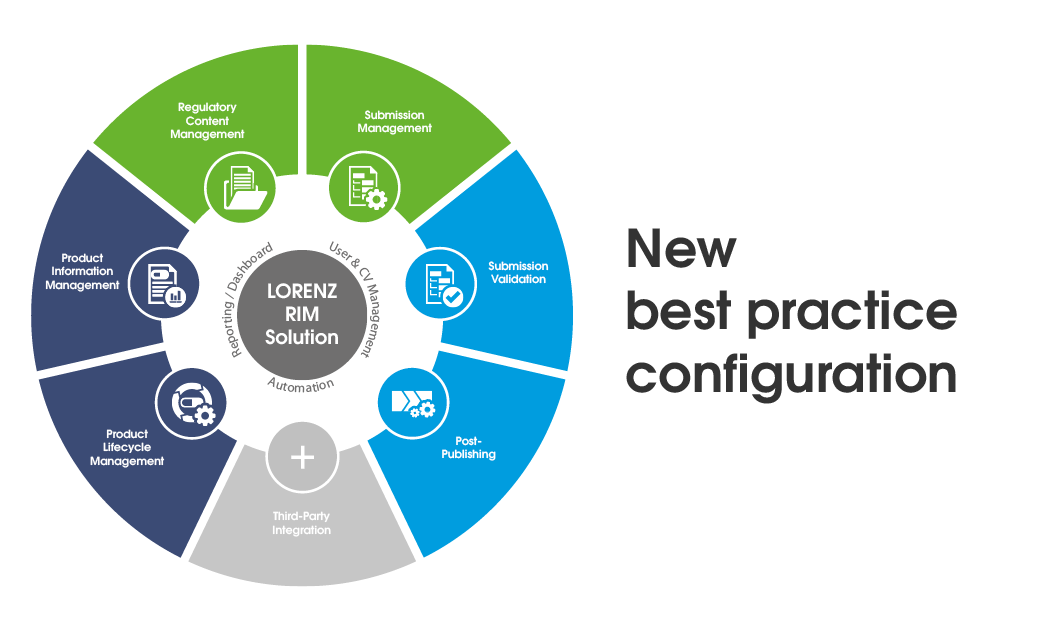
LORENZ RIM comes with a best practice configuration that helps new customers get started quickly and efficiently. This configuration has now been thoroughly updated, incorporating customer feedback and practical experience to better support real-world use. It is available for both cloud and on-premise customers, with Assisted Compilation now covering more regions and general usability improvements throughout. Upgrades to include additional capabilities are now easier, requiring less service effort and fewer manual steps.